A working brief and timeline
Two actual room attachments give the team a common reference for responsibilities and exercise milestones.
Cyber – Operations Center
Six specialists turn a developing observation into a clear decision and a confident handover, with the conversation and its supporting information kept together.
THE CHALLENGE
An exercise team needs a common picture as observations develop and ownership changes. Monitoring, network, planning, and evidence desks must be able to follow the reasoning, correct an earlier interpretation, and leave the incoming watch with clear next steps.
Morgan brings the desks into one coordination room. Alex reports a rise in training sign-ins, while Jordan compares the observation with the planned exercise arrivals.
Alex corrects the timing of the first observation. Daniel retains that correction with the evidence, and the team agrees what the comparison supports without overstating the result.
The coordination brief and timeline sit alongside the chat. Room notes capture the decision and open items; bookmarks help everyone find the same working references.
Sofia confirms the handover and briefing times. Leah brings the status, owners, next check, and incoming acknowledgement together so the next watch can continue from the same room.
SEE THE WORKFLOW
Explore the desktop plugin and browser experience one at a time. Focused crops make the details easier to see; the full, redacted captures remain a click away.
The ITS plugin brings the room conversation and its shared resources into HCL Sametime Connect. These captures show plugin build 1.2.193.
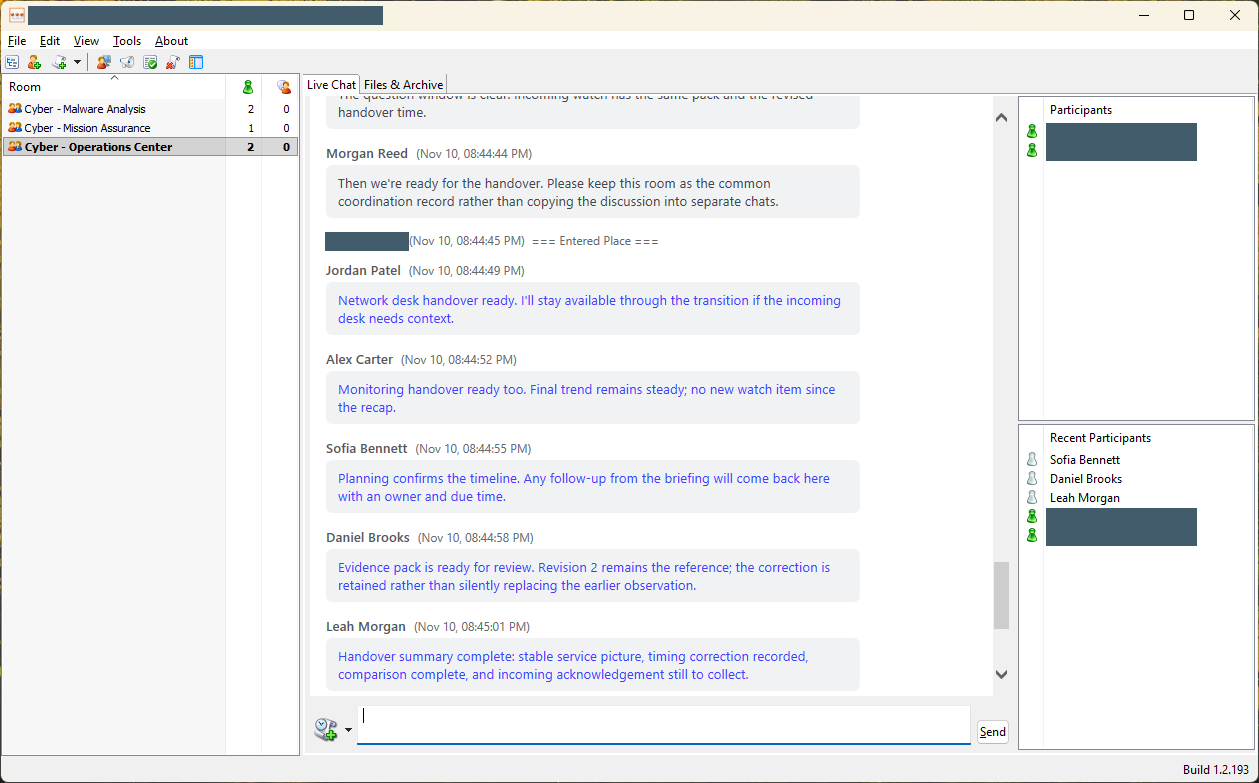
The complete plugin window shows the room list, handover discussion, and participant panels together. The screenshot was taken after the scripted exchange; its current roster is not the six-user demo roster.
MORE THAN THE LATEST MESSAGE
Two actual room attachments give the team a common reference for responsibilities and exercise milestones.
Two saved notes retain the evidence limits, checkpoint decision, and incoming watch's handover actions.
Two room bookmarks link to the working brief and timeline, keeping useful references easy to find.
Conversation history and the room's archive browser help returning participants recover the context of earlier discussions.
THE TECHNOLOGY BEHIND THE TEAMWORK
Team Sessions connects the live conversation to the information a team needs to keep working. Desktop and browser participants enter the same collaboration environment.
Sametime provides the real-time room messaging and participant-awareness layer. Team Sessions connects desktop and browser participants to that shared live conversation.
The ITS plugin works inside HCL Sametime Connect. The Team Sessions browser bridge connects authenticated web users to native Sametime rooms, with the room's shared information available alongside chat.
Domino stores room configuration, captured chat history, and shared content. Team Sessions capture services retain the conversation so authorized users can recover context when they return.
Authentication, room permissions, database access control lists, and document-level controls determine what a user can access. Choosing a browser does not bypass the deployment's access rules.
WHAT THIS SCENARIO BRINGS TOGETHER
Harbor Light is fictional demonstration content. Six real demo sessions submitted 48 messages through Sametime, and all six signed out at completion. The captures show the real plugin and browser clients; the six scripted authors were not assigned alternating desktop/browser devices.
Only real operator names and the server IP were masked. Every unmasked screenshot pixel was verified unchanged. Counts, timestamps, fictional authors, and build labels were preserved.
Conversation captures show different moments. The archive screenshot shows older room history. This example is a functional demonstration, not a capacity benchmark or a deletion/migration qualification.