HCL Notes · room administration
What happens when a room closes?
An exercise is over. Before retiring its room, an administrator needs to inspect the contents, choose the appropriate action, and verify the outcome. Follow those steps in the 2026 Notes template.
Inventory the room
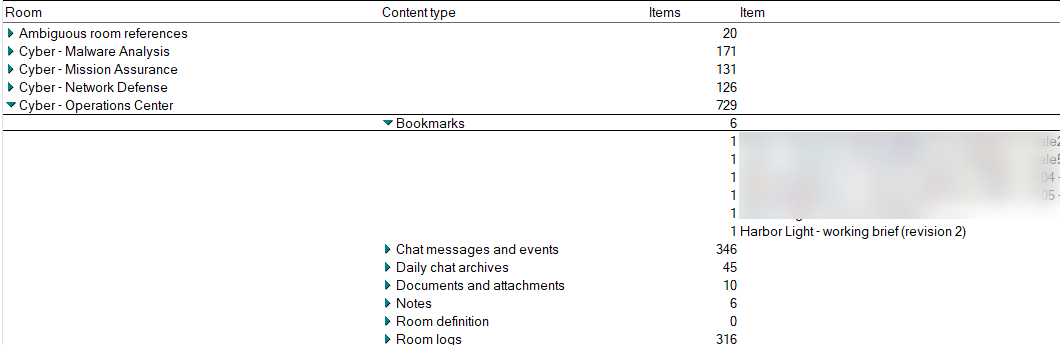
Under Rooms (Places), open Browse Room Content – Expand and Collapse. Expand a room to see counts by type, then expand a type to open individual items. This Operations Center room contains 45 daily chat archives, ten documents and attachments, and six notes.
Queue the selected room
Use Select Room(s) To Delete to preview removal, confirm the room identity, and submit a request. Open Room Deletion Queue to follow processing. Background processing keeps Notes available. To retain the room through migration instead, use Select Room(s) to Migrate and Archive and follow its separate queue and record.

Read the outcome
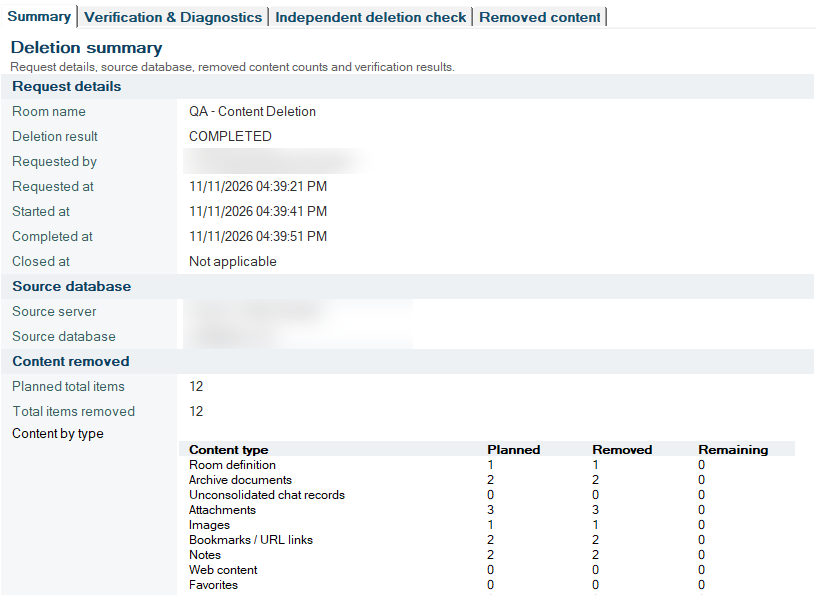
In Deletion Records, open the completed request. For QA – Content Deletion, the record reports 12 items planned and 12 removed. Check remaining counts by type or request an independent deletion check.